What to Look for in Headphones for Calls and Video Meetings
Published Updated
A clear guide to finding headphones that keep your voice intelligible, stay comfortable through long meetings, and behave well across the devices you actually use.
A meeting can go sideways before anyone reaches the agenda: your voice fades under a passing truck, the earbuds rub after 40 minutes, or your laptop refuses to hand off audio when a call arrives on your phone. For calls, great sound in your own ears is only half the job. The person on the other end needs to hear you without strain. The direct answer is to prioritize microphone performance in realistic noise, a fit you can wear for the length of your longest call, and connection behavior that suits your workday. Noise cancellation, music quality, and battery life still count, but they should not distract from the unglamorous details that decide whether you sound present or perpetually apologetic.
Headphones for calls solve the problem of sounding distant or distracted
Call quality begins with the microphone system, not the speakers. A headphone may make music feel rich and detailed while its microphones leave your voice thin, muffled, or buried by a café grinder. Look for reviews and product details that address voice clarity in quiet rooms and in ordinary nuisance noise such as traffic, wind, keyboard clatter, or nearby conversation. A claim that a model has several microphones is not a verdict on how naturally it handles your voice.
Microphone placement changes the odds. A boom microphone, the small arm that sits near your mouth, usually gives the system a clearer starting point than tiny microphones hidden in an earbud or ear cup. That does not make every boom headset better, but it is a sensible choice for long work calls, customer-facing roles, and voice chat where being understood matters more than a discreet silhouette. Earbuds and over-ear headphones can work very well too, provided their voice processing does not make speech sound chopped up or oddly synthetic.
Noise reduction should protect your voice without erasing its character
Call noise reduction tries to separate your speech from the world around you. It can soften a fan, road noise, or a busy room, but it has limits. Nearby voices, sudden clatters, wind gusts, and the sound of you talking over someone else are harder problems than the steady low rumble of an airplane cabin. Treat phrases such as "AI noise reduction" or "crystal-clear calls" as invitations to look closer, not as a promise that a crowded coffee shop will disappear.
There is a tradeoff to listen for. Aggressive processing may remove background noise but can also clip the beginning or end of words, flatten your voice, or make it sound as if you are speaking from a tunnel. For a quiet home office, a natural, full voice may matter more than extreme suppression. For calls taken on sidewalks or trains, stronger filtering can be the better compromise. Think about the noisiest place where you regularly need to sound competent, not the quietest room where any microphone can shine.
Sidetone keeps you from talking like you are underwater
Sidetone feeds a little of your own voice back into your ears during a call. It sounds minor until you wear a sealed pair with active noise cancellation, or ANC, which uses microphones and processing to reduce steady outside noise. Without enough sidetone, your voice can feel trapped inside your head. Many people respond by speaking too loudly, then discover they have been broadcasting their meeting to the whole train car.
The useful version is adjustable. A low setting can make speech feel more natural without flooding your ears with room noise; a higher setting may help when you need awareness of your surroundings. Some headphones call this voice feedback, own voice, or a similar name. If the control is buried in an app, check whether it stays set after reconnecting. A feature that resets every time you join a call is less helpful than one simple physical control you can trust.
Comfort is call quality after the first half hour
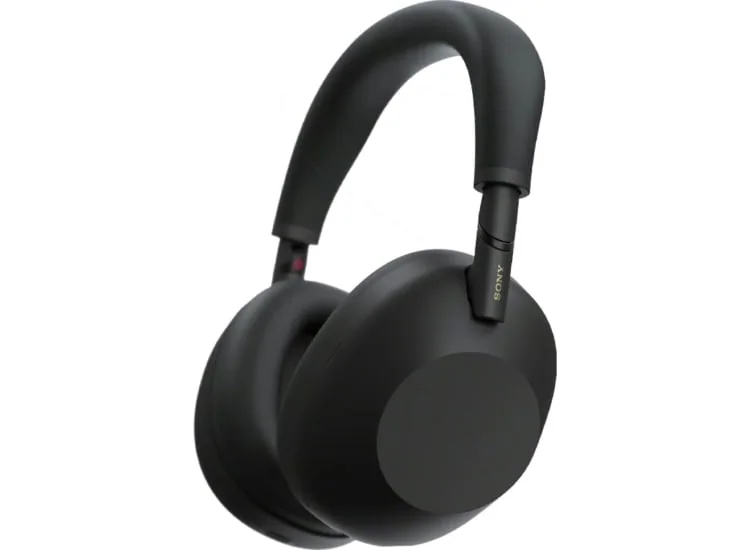
A headset that hurts becomes a headset you avoid, and that is a poor bargain even if its microphone is excellent. Over-ear headphones spread pressure around the ear, which can suit long desk sessions, but clamp force, ear-cup depth, heat, and the way the headband meets your hair all matter. Glasses can break the seal around the ear cups, changing both comfort and noise isolation. A lighter pair is not automatically more comfortable if its pads press on the wrong spot.
True wireless earbuds are easier to carry and can be less conspicuous on camera, yet their fit is more personal. The ear tips need to seal gently enough to stay put without creating a sore pressure point. A loose earbud can shift the microphones and make your voice less consistent, especially while walking. If you spend hours in meetings, consider whether you can comfortably use one earbud at a time, switch sides during the day, or take short breaks between calls. The best call setup is one you can still tolerate by late afternoon.
Device switching can save a meeting or create a small disaster
Many people take calls on a phone, join meetings from a laptop, and occasionally use a tablet or desktop computer. Bluetooth multipoint lets headphones maintain connections with two devices at once, so they can move between them without a full disconnect and repair. It can be genuinely convenient, but behavior varies. One pair may smoothly pause laptop audio for an incoming phone call; another may need a tap in its app or a manual selection in your computer's sound menu.
Check the devices that matter before you commit. Some headphones offer their best switching features only within one device family, while consoles, airplane entertainment systems, older stereos, and desktop PCs may need a cable, adapter, or separate Bluetooth transmitter. For video meetings, also confirm that your computer recognizes the headphone microphone reliably. A model that connects beautifully for music but defaults to the laptop's poor built-in mic is not solving the problem you bought it to solve.
The right shape depends on where your calls actually happen
Over-ear wireless headphones make sense when calls happen at a desk, in a shared office, or on long trips. Their larger batteries and ear pads can be easier to live with for hours, and active noise cancellation can reduce the fatigue of steady background sound. They are less appealing in hot weather, in a crowded bag, or for someone who needs to look and feel unencumbered between meetings.
True wireless earbuds fit the person who takes calls while commuting, running errands, or moving around a workplace. Their charging case is convenient, but check single-charge runtime rather than only the impressive total with the case. Calls, noise cancellation, volume, and voice features can shorten a day's listening time. Wired headphones or a wired headset remain a practical desk answer when charging is one more thing you do not want to manage, though you need to verify the connector on your phone or computer and whether a USB-C, Lightning, or 3.5 mm adapter is required.
What this guide helps you understand
For calls and video meetings, choose the pair that makes your voice clear in your usual environment, feels comfortable through your longest session, and switches predictably between the devices you use.
Make a test call from the noisiest place you commonly work, then ask the listener whether your voice remains natural and easy to understand.
Wear the headphones for at least the length of a typical meeting, paying attention to pressure, heat, ear-tip stability, and how your voice sounds to you.
Confirm microphone support, Bluetooth behavior, and any required adapter with your work laptop, phone, and other essential devices.
Check single-charge battery life with the call and noise-control settings you expect to use.
Technique notes
Active noise cancellation helps you hear a call in steady noise, but it is separate from the microphone processing that determines how well others hear you.
A boom mic can be less subtle than earbuds, but its position near your mouth often makes it the more dependable choice for demanding voice work.
If you use glasses, try over-ear headphones with them on. The arms can affect both comfort and the ear-cup seal.
Keep a wired backup option or a charged pair available for important calls when wireless reliability is not negotiable.
Safety note: Keep enough awareness of traffic, announcements, and people nearby when taking calls while walking or commuting.