
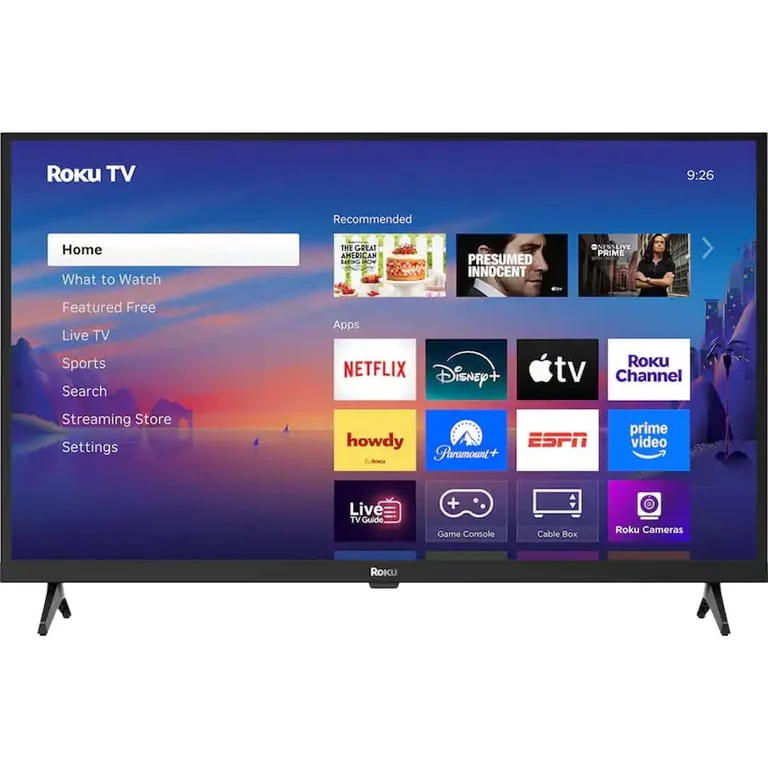
What to know first
- 1080p resolution at 32 inches, a size built for secondary rooms rather than main living rooms
- Roku's smart platform is built in, so there's no separate streaming stick to manage
- Best suited to casual viewing, not sports, fast gaming, or detail-heavy movie nights
- A simple, familiar remote and menu system if you already use Roku elsewhere in the house
- Not the right pick if 4K resolution or a wide HDR format matters to you
A Roku streaming stick that happens to be a TV
Roku built its name on the streaming stick, the little dongle that plugs into any TV's HDMI port and turns it into a smart TV. The 32-Inch Select Series takes that same interface and puts it directly inside a small, budget 1080p television, so there's no dongle to lose, no extra remote to hunt for, and one less cable behind the stand.
At 32 inches and 1080p resolution, this set is sized and specced for a bedroom, a kid's room, a kitchen counter, or a small apartment, not a living room where a bigger 4K screen would typically take over. Roku isn't positioning this as a flagship television, and it shouldn't be judged like one. It is the easiest, least complicated way to get a Roku experience on a screen you don't already have a streaming device for.
The pitch is simplicity over spectacle. Buyers who already know and like Roku's channel store, search function, and remote layout get all of that without adding another piece of hardware to the pile.
One less box, one less remote
The real selling point here isn't the screen, it's the fact that the smart platform and the display ship as a single product. Anyone who has ever misplaced a streaming stick remote, or dealt with an HDMI input mysteriously switching itself, understands the appeal of a TV that doesn't need a second gadget attached to work.
Because the platform is Roku's own, the home screen, app store, and voice search are the same ones used across the company's streaming sticks and other Roku TVs. That familiarity matters more than it sounds: someone replacing an old TV with this one, or setting it up for an in-law or a teenager, isn't teaching anyone a new system.
Where this model does not stand out is picture performance. A 1080p panel at this size and price point is not built to compete with 4K sets on detail, and there's no indication this model targets the higher refresh rates or wide HDR format support that make a real difference for sports and gaming. Buyers should treat the resolution and refresh rate as basic and plan their expectations around a secondary set, not a main screen.
Setup that matches its size
A TV this size and category is built for straightforward setup: connect to Wi-Fi, sign into a Roku account, and start browsing channels through the same interface Roku has used for years. Anyone upgrading from a Roku stick on an older TV will recognize the remote layout instantly, right down to the shortcut buttons for major streaming services.
Daily use plays to the strengths of a small secondary TV. It is a screen that gets left on in the background during morning routines, used for casual sitcom reruns before bed, or handed off to a kid's room where a giant 4K display would be overkill. The plain remote and simple menu reduce the friction of getting from power-on to a show playing.
Where the ownership experience gets less exciting is around connections. Category standards suggest budget sets like this typically keep HDMI inputs limited, which means anyone wanting to also plug in a game console, soundbar, and streaming box should count their available ports before assuming everything will fit without unplugging something else first.
What this size and resolution actually cost you
The most important thing to understand before buying is what this TV is not. It's not a 4K set, so streaming services offering higher resolution content will be capped by the panel itself. It's not built around a high refresh rate, so fast motion in sports broadcasts or action-heavy gaming won't look as smooth as it would on a set designed for that use.
Out-of-the-box picture settings on budget TVs in general are often tuned to look punchy in a bright store aisle rather than accurate on a living room wall, and there's no reason to assume this model breaks that pattern. Expect to spend a few minutes in the picture settings menu adjusting brightness and color to something more natural for home viewing.
None of this makes the TV a bad purchase, it just narrows who it's a good purchase for. Buyers expecting a do-everything television for a main room will be disappointed. Buyers who wanted a small, simple, Roku-native screen for a secondary space are getting exactly what the product promises.
The specs that matter
Fits comfortably in a bedroom, kitchen, dorm, or small apartment where a larger 4K TV would feel oversized or unnecessary.
Sharp enough for casual viewing at typical secondary-room distances, but it won't match the detail of a 4K set, which matters more the closer you sit and the larger the screen.
Skips the need for a separate streaming stick and gives you the same familiar Roku home screen, search, and remote used across the brand's other devices.
Fast motion in sports or gaming won't look as smooth as it would on a 120Hz panel, so plan on this being a set for casual viewing rather than competitive gaming.
Count your devices, a game console, soundbar, and streaming box can quickly outnumber the available ports on an entry-level TV.
Who this product fits
Furnishing a kid's bedroom on a budget
This is close to an ideal fit: a small, simple screen with a familiar remote, no extra streaming box to plug in, and a size that won't dominate a small room.
Replacing a living room centerpiece TV
Look elsewhere. The 1080p resolution and standard refresh rate won't satisfy someone used to a bigger, sharper 4K set for movie nights or sports.
Already own a Roku streaming stick and love it
The built-in platform means one less remote and one less HDMI port used up, a genuine convenience upgrade for a secondary TV.
Setting up a home gym or kitchen TV
The small size and simple interface suit background viewing well, casual news or podcasts playing while you cook or work out don't need 4K detail.
What else to compare
If picture quality or gaming performance is the priority, a step up to a 4K set with a higher refresh rate is worth considering instead.
Roku 32-Inch Select Series 1080p Smart TV FAQ
Is the Roku 32-Inch Select Series 1080p Smart TV good for gaming?
It's fine for casual, slower-paced games, but the standard refresh rate and 1080p resolution mean it won't deliver the smooth motion or fine detail that competitive or fast-action gamers want from a TV.
Do I need a separate Roku streaming device with this TV?
No. The Roku smart platform is built directly into the television, so there's no need for an external Roku stick or box.
How many HDMI ports does this TV have?
Budget sets in this class typically ship with a limited number of HDMI inputs, so it's worth counting your devices, console, soundbar, streaming box, before assuming everything will connect at once.
Is this TV 4K?
No, it's a 1080p panel. If 4K resolution matters to you, this model won't deliver it regardless of screen size.
Will the picture look good right out of the box?
Expect default settings tuned for brightness and pop rather than accuracy. A few minutes adjusting picture settings after setup usually improves the picture for normal home viewing.
Who actually needs this TV
Nobody buys a 32-inch 1080p TV expecting a showstopper picture, and the Roku 32-Inch Select Series doesn't pretend otherwise. Its entire case rests on convenience: a built-in, familiar smart platform, one less remote in the house, and a size that fits rooms where a bigger screen would be wasted.
For a secondary room, a kid's space, or anyone already comfortable with Roku's interface, it does exactly what it needs to do without asking for much in return. For a main living room screen, keep looking, this one was never built for that job.