

Pickori's Take
- Buy it if meetings fill most of your week, especially in a shared office or a busy home.
- The boom is the reason to choose it. A microphone near your mouth gives the voice processing less room noise to fight.
- The on-ear fit is the main thing that decides whether it suits you.
- If calls are occasional and your room is quiet, headphones you already own may be enough.
Is the Evolve2 75 right for your workday?
Match your routine to the row that describes it.
| Your routine | Fit | Why |
|---|---|---|
| Back-to-back calls in a shared or noisy space | Strong fit | This is the situation a close boom microphone is built for. |
| Teams-first company with managed laptops | Strong fit | The Teams button helps, and the included adapter is the setup we would recommend. |
| Calls plus focus time at a desk | Good fit | One headset covers both without swapping, though the boom stays attached. |
| Glasses wearer or sensitive to ear pressure | Test carefully | Fit is the deciding factor. Wear it through real meeting blocks. |
| A few calls a week from a quiet room | Probably unnecessary | Headphones you already own may be enough. Browse other options in our headphones hub. |
Built for the hours you spend talking
Picture a normal hybrid workday. A standup at nine, a client call at ten, an hour of writing, then three meetings in a row after lunch. The Evolve2 75 is built for that pattern. The boom doubles as your mute control (by default), the same headset carries you through focus time between calls, and you can step away from the desk without swapping devices.
This review covers the black Microsoft Teams version, model 27599-999-999, sold with a USB-A adapter and charging cable. The USB-C version is the same headset with a different adapter plug.
Jabra has since released a newer on-ear model, the Jabra Evolve3 75, and we review it separately.
The Evolve2 75 is still a strong buy on its own merits, and its audience is clear: account managers, support leads, recruiters, consultants and anyone who runs meetings rather than just attending them. Its business features pay off when you use them dozens of times a day.

Microphone and call quality: why the boom matters
Every work headset serves two listeners. You hear the meeting, and your colleagues hear you. Active noise cancellation helps with the sound reaching your ears. A headset that makes your office feel silent has not made you sound any clearer on the other end. That depends on where the microphone sits and how well the processing separates your speech from the room.
This is where the boom earns its place. A microphone closer to your mouth picks up more voice relative to keyboard clatter, a nearby conversation or an air conditioner, so the processing starts from a stronger signal and has less to remove. That is a design argument, not a lab result, and Pickori is not claiming it beats any particular rival. For a noisy or shared space, though, it is the right starting point.
Setting the boom consistently matters more than people expect. A boom that sits in a slightly different spot each call gives colleagues a voice that changes from meeting to meeting, which is easy to mistake for a fault.
Owner reports are mixed, and they come from people who chose to post. Several verified buyers praise Teams voice clarity and office noise cancellation. Others describe a very quiet microphone, cutouts, unexpected muting despite updates, and a microphone that failed after a year of call-center use. That small, self-selected set cannot give a failure rate, and no shared cause is documented. Some complaints may come down to setup, such as the wrong input or an app's noise suppression stacking on Jabra's own. That is a possibility, not a diagnosis.
Firmware matters too. Jabra's 1.13.1 update from May 20, 2026 addresses microphone level fluctuation that appeared after version 1.11.7. It fixes that bug, not every complaint ever reported, so install it before you judge the microphone.

Mute you can see and feel
By default, raising the boom mutes you and lowering it unmutes you. Jabra's software can change that. You can also talk with the boom up: enable earcup pickup in Jabra Direct or Sound+, raise the boom and press the Voice button. Lowering the boom fully switches back. Earcup mode is fine for a quick reply in a quiet room, but use the boom when it matters how you sound.
A physical mute beats hunting for an on-screen button, and anyone who has talked for a minute while muted knows the value of a control you can feel. Still, treat the arm as a strong cue rather than a privacy guarantee. If you change the default, or the app falls out of step with the headset, the arm stops telling the whole story, so watch the app's mute icon until you trust the pairing.
Taking the headset off can mute a call and pause music, and that is configurable too. A button switches between ANC and HearThrough so you can hear someone at your desk, and red busylights signal that you are on a call.
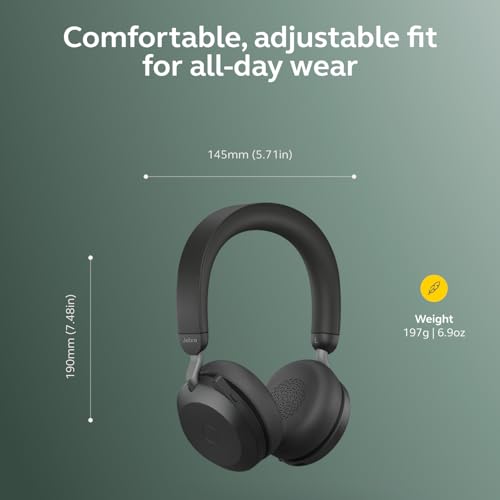
Comfort: on-ear fit, glasses and long meetings
This is an on-ear headset, and that single fact decides comfort more than any other. Some owners praise the fit. Others report pressure that becomes uncomfortable, including one who said it got worse over about a year. Both can be true, because heads differ.
Glasses deserve a specific check. With pads that rest on the ear, the temple arms of your glasses sit under the cushion, so pressure concentrates on the frame. That is reasoning about the design, not a measurement, but if you wear glasses all day it is the first thing to test.
The useful test is a real working afternoon, not a two-minute try-on. Wear it through one block of meetings, take a break, then wear it through another. How you feel at the end of that second block tells you far more than first impressions.

While you're comparing
The right product, at a better price
Our free morning email rounds up discounts worth knowing about, from kitchen upgrades to everyday tech. Reviews and buying guides arrive separately in our occasional newsletter.
Free to joinUnsubscribe anytime
Laptop, phone, Teams and Zoom
On a work laptop, we would use the included adapter rather than built-in Bluetooth. Managed laptops often have locked-down drivers or inconsistent Bluetooth stacks, and a dedicated adapter is a more predictable starting point that IT departments generally recognize. Native Bluetooth may work fine, but results depend on that machine.
The natural setup is the laptop through the adapter and your phone paired directly, so you can take a mobile call or play music without re-pairing. Having both connected does not mean two overlapping calls will blend smoothly, so before an important meeting it is worth disconnecting anything you don't need.
Choosing between the Teams and UC versions is a software decision, not an audio one. The Teams version adds a dedicated Teams button and Teams setup out of the box, and it still works with other leading call apps, including Zoom, though some controls may behave differently. The UC version does not have a better microphone. If your company runs Teams, choose this one, and check your employer's approved-device list either way.
The USB-A or USB-C choice comes down to your ports. If your laptop has both, USB-A leaves a USB-C port free for charging or a display.
Between meetings: music, focus time and leaving the desk
The real advantage between meetings is continuity. Keeping one headset on all day means no swapping to earbuds after a call, no re-pairing, and no scramble when a colleague calls during focus time. Keeping your meeting app and music on the laptop also avoids shifting the audio source between devices.
The trade-off is that this is a work headset first. The boom stays attached even when folded, which some people won't want on show outside the office, and on-ear pressure that is fine for a meeting block may feel different across a full day of calls plus listening. Calls and music also draw on the same battery, so heavy listening eats into your call reserve.
If dedicated listening or travel noise cancellation is the main reason you're shopping, a consumer pair built for that job is the better match. If you mainly want one headset that handles calls well and doesn't need to come off between them, this is the more practical choice.
Battery, charging and repair
Jabra's rated figures describe separate call and music workloads. A mixed day will not follow either one exactly. For buying purposes, focus less on squeezing out the advertised maximum and more on whether your normal charging routine fits your workday.
There is a useful long-term ownership point here. Jabra publishes a battery repair guide for the Evolve2 75, so a fading battery does not have to mean replacing the headset. The guide doesn't promise parts are in stock or say what they cost, so check with Jabra or your IT supplier when the time comes.
Who should pay for it, and when a discount matters
The people who get the most from this headset are easy to spot: several hours of calls a day, a shared or noisy space, and colleagues or customers who need to hear them clearly. Support staff, salespeople, managers running back-to-back meetings and recruiters fit this description.
Someone who takes a handful of calls a week from a quiet home office is different. A quiet room does much of the work a boom would otherwise do, so existing earbuds or headphones will probably be fine.
There is a middle group too: people who use personal headphones for calls and keep hearing that they sound distant or muffled. That complaint is a strong signal a close microphone would help, and this headset is a sensible next step.
A discount strengthens the case but shouldn't be the reason you buy. Pickori doesn't set a price threshold. Decide whether you'll use the call features often enough, then let a good offer make the decision easier.
Your first-week check
Update to firmware 1.13.1 or later in Jabra Direct. In your meeting app, select the headset (it may appear as Jabra Link adapter) for both microphone and speaker, then check your operating system's microphone permissions.
Call an honest colleague with the boom down, in your usual room, on the app you use most. Ask whether your voice stays consistent, including sentence endings and when you turn your head. If something sounds off, record a short clip in your system recorder using the same input and connection. A clean clip points toward app settings, though it doesn't fully rule out hardware.
In the same week, wear it through two full meeting blocks, with glasses if you use them. If the microphone still misbehaves across apps or the fit doesn't work, return it within the retailer's window.
Who this product fits
Jabra Evolve2 75 FAQ
How good is the Jabra Evolve2 75 microphone?
The boom is a strong starting point for noisy rooms, but owner reports are mixed. Update the firmware and run a test call early.
Does the Teams version work with Zoom?
Yes. It works with other leading call apps. The Teams button and setup are extras for Teams users.
Does ANC make my voice clearer to others?
No. It changes what you hear. How you sound depends on the microphone position and voice processing.
Can the battery be replaced?
Jabra publishes a battery repair guide, but check spare-part availability and cost before relying on it.
Is the Jabra Evolve2 75 worth buying?
Yes, if meetings are a real part of your day. A close microphone, controls you can find without looking and one headset that covers calls and focus time make it a practical daily tool, and a discount makes a good fit easier to justify.
Skip it if on-ear headsets have bothered you before or your calls are rare and quiet. Otherwise, it is one of the more sensible ways to sound better on calls.
Sources and research notes
We combine Jabra documentation and individual owner reports with our own analysis of call controls, connectivity and everyday use. This is a research-based review, not a hands-on test. How Pickori evaluates products.
Independent evaluations
- Jabra Evolve3 75 reviewPickori
Official product information
- Evolve2 75 product informationJabra
- Evolve2 75 technical specifications and exact variantsJabra
- Evolve2 75 user manual (RevF): microphone modes, controls and contentsJabra
- Evolve2 75 firmware and supportJabra
- Evolve2 75 battery repair guideJabra
- Microsoft Teams and UC headset variants explainedJabra
- Teams microphone settings and troubleshootingMicrosoft
- Evolve3 series announcementJabra
Retailer listings and evaluations
- Individual Evolve2 75 customer reportsAmazon owners